 Professor Franklin
Chapter 3 · Reading 2 of 3
Write blockers, interfaces and verified images
CHFI domains 1, 2, 3, 4, 6 · GCFE: Evidence collection for forensic triage
Back at the academy, the examiner opens the Ridgeway workstation. Inside is a small M.2 card rather than the 2.5-inch drive the request described. The lab’s usual SATA write blocker will not connect to it. The image must still be a complete, verified copy made without changing a single bit on the original. That starts with knowing what kind of storage is in front of you.
Identify the interface
A disk interface is the physical and logical connection between storage and the computer. The interface determines which write blocker and adapter the examiner needs.
| Interface | Where it appears | Collection note |
|---|---|---|
| SATA | Most 2.5- and 3.5-inch drives, older M.2 cards | Widely supported by hardware write blockers. |
| SAS | Servers and storage arrays | Needs a SAS-capable blocker. Arrays may need to be imaged as a whole volume. |
| NVMe | Modern M.2 and U.2 SSDs, connected over PCIe | Needs an NVMe-capable blocker or adapter. Check the M.2 key and length. |
| USB | External drives and flash media | Use a USB write blocker. Some external drives hide a SATA drive behind a bridge board that may encrypt data. |
An M.2 card can be either SATA or NVMe, and the two use different notches on the edge connector. The Ridgeway card is NVMe, so it goes into an NVMe-capable write blocker. Some laptops solder storage to the board, and some encrypt it with a key bound to that board. In those cases, removing the drive is impossible or pointless, and a live or logical collection may be the only option.
Block writes in hardware
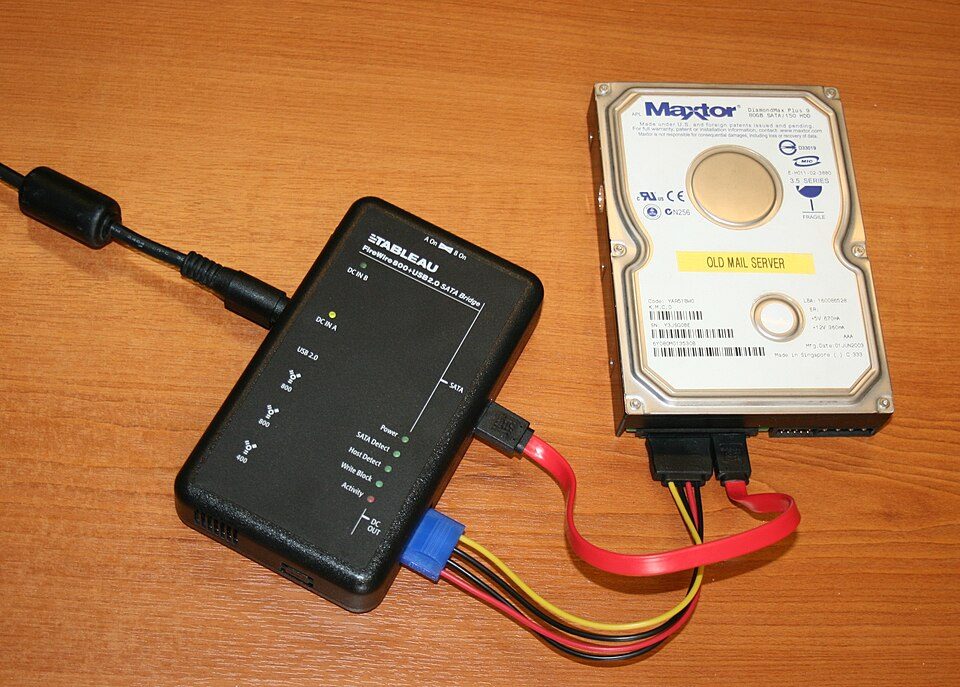
A write blocker sits between the evidence drive and the examiner’s computer and allows read commands while blocking anything that would change the drive. Simply connecting a drive to a running operating system can change it, because the system may mount volumes, update timestamps or write journal entries. A hardware write blocker enforces protection in a separate device regardless of what the computer attempts. A software write blocker enforces it in the operating system, which is useful in the field but depends on that system working correctly. Either kind must be tested and its test recorded, as Reading 3 describes.

Choose an image format
A forensic image (or bit-stream image) copies every sector of the source, including unallocated space and slack, not just the visible files. The format determines what else is stored alongside the data.
- Raw (dd) is an exact sector-by-sector copy with nothing added. Every tool reads it, but case metadata and hashes must be kept separately, and it is not compressed.
- E01 (Expert Witness Format) stores the data in compressed segments with case information, checksums for each block and a hash of the whole acquisition. FTK Imager, Guymager and many other tools write it.
- AFF4 is an open format designed for large evidence sets and memory images, with metadata stored in a structured way.
Tools such as FTK Imager (Windows), Guymager (Linux, with a graphical interface) and dc3dd (a forensic version of the Unix dd command that hashes while it copies) all record the tool version, source identifiers, start and end times, hash values and any read errors. That record is the acquisition log, and it goes in the case file.
Verify the copy
Verification compares a hash of the source with a hash of the image. If they match, the image is an accurate copy of what the drive returned. If they do not match, the examiner investigates before doing anything else.
A mismatch has a few common causes: the drive changed between hash runs because a write blocker was not working, a failing drive returned different data from weak sectors on each read, or the image is incomplete. A drive with bad sectors may never produce matching hashes. The log then records which sectors could not be read and how the tool filled them, and the examiner hashes the image so its own integrity can be verified from then on.
Collection drives must be sanitized before reuse so data from one case cannot contaminate another. NIST SP 800-88 describes three levels: clear (overwrite with standard commands), purge (techniques such as a cryptographic or block erase that resist laboratory recovery) and destroy. For SSDs, use the drive’s built-in sanitize or cryptographic erase command, since simple overwriting may miss blocks the controller has remapped. Record each wipe and its verification.
On the exam, a hash match proves integrity, not that the evidence is relevant or that the collection was authorized. The next reading, Targeted triage and the forensic laboratory, covers when to skip the full image and how a lab makes all of this repeatable.
Inspect the three records, then use the evidence to answer the question.
1. Source hash
SHA-256 of source: 9c41…7b02
2. Image hash
SHA-256 of image data: 9c41…7b02
3. Read errors
Bad sectors reported: 0
Apply the reading
The source drive’s SHA-256 hash, computed before imaging, does not match the hash of the image. What are the possible explanations, and what would you check first?
Compare your reasoning
The drive may have changed between hash runs (for example, without a working write blocker), it may have unreadable sectors read differently on each pass, or the image may be incomplete or corrupt. Check the acquisition log for read errors and the write-blocker status, then rehash the source and image.