 Professor Franklin
Chapter 4 · Reading 1 of 3
Partitions, boot records and storage media
CHFI domains 3, 4 · GCFE: Forensic methods, Windows filesystems and Registry foundations
The Ridgeway image opens in two viewers. Viewer A says the disk has no usable partitions. Viewer B lists a 237 GB NTFS volume full of user files. A careless examiner would trust whichever tool came first. A careful one opens sector 0 and reads what is actually there.
Sectors, offsets and endianness
Storage is addressed in sectors, traditionally 512 bytes and on many modern drives 4,096 bytes, though most still present 512-byte logical sectors. A logical block address (LBA) numbers sectors from 0. To find a structure, multiply its LBA by the sector size to get a byte offset. Multi-byte numbers on x86 systems are stored little-endian, least significant byte first, so the four bytes 00 08 00 00 mean 0x00000800, which is 2,048.
Read the master boot record
The master boot record (MBR) occupies LBA 0. Its first 446 bytes hold boot code. At offset 446 (0x1BE) comes the partition table: four 16-byte entries. The last two bytes of the sector, at offset 510, are the signature 55 AA.
80 20 21 00 07 FE FF FF 00 08 00 00 00 40 06 00
- Boot indicator: 0x80 marks the active (bootable) partition.
- Partition type: 0x07 is NTFS or exFAT. 0x0B and 0x0C are FAT32, 0x83 is Linux, 0xEE is a GPT protective entry.
- Starting LBA, little-endian: 2,048. Bytes 1–3 and 5–7 are legacy cylinder-head-sector values that modern tools ignore.
- Number of sectors, little-endian: 0x00064000 = 409,600 sectors, which is 200 MiB at 512 bytes per sector.
MBR stores sizes in 32 bits, which limits it to 2 TiB with 512-byte sectors, and holds only four primary entries. An extended partition works around the second limit with a chain of logical partitions.
Read the GUID partition table
The GUID Partition Table (GPT) replaces MBR on modern systems. LBA 0 holds a protective MBR with a single entry of type 0xEE covering the disk, so old tools see the disk as occupied rather than empty. LBA 1 holds the GPT header, which begins with the ASCII signature EFI PART. The partition entries follow, usually starting at LBA 2, typically 128 entries of 128 bytes each. Each entry holds a partition-type GUID, a unique partition GUID, 64-bit start and end LBAs and a name. A backup header and entry table sit at the end of the disk. That explains Ridgeway: Viewer A read only the protective MBR, saw type 0xEE and stopped. Viewer B read the GPT.
Follow the boot process
Knowing how a system boots tells you where to look for tampering and which partitions matter.
- Firmware runs power-on self-test, then loads LBA 0 and runs the MBR boot code.
- The boot code finds the active partition and loads its volume boot record.
- That loads the Windows Boot Manager (bootmgr), then winload.exe and the kernel.
- Firmware reads the GPT and finds the EFI System Partition, a small FAT32 volume.
- It runs a boot application such as \EFI\Microsoft\Boot\bootmgfw.efi, chosen from boot entries stored in firmware variables.
- Secure Boot checks signatures on the boot chain before running it.
On Linux, UEFI firmware usually loads a boot loader such as GRUB (or shim, then GRUB, with Secure Boot), which loads the kernel and an initial RAM file system. The kernel then starts init, today usually systemd. On an Intel Mac, UEFI firmware loads macOS’s boot.efi. On an Apple silicon Mac, a chain of signed stages in the system-on-chip, including iBoot, verifies and loads the kernel from a sealed, read-only system volume. Boot configuration files, boot entries and the EFI System Partition are places where persistence and tampering can hide.
Know the medium under the file system
The physical medium decides what survives deletion.
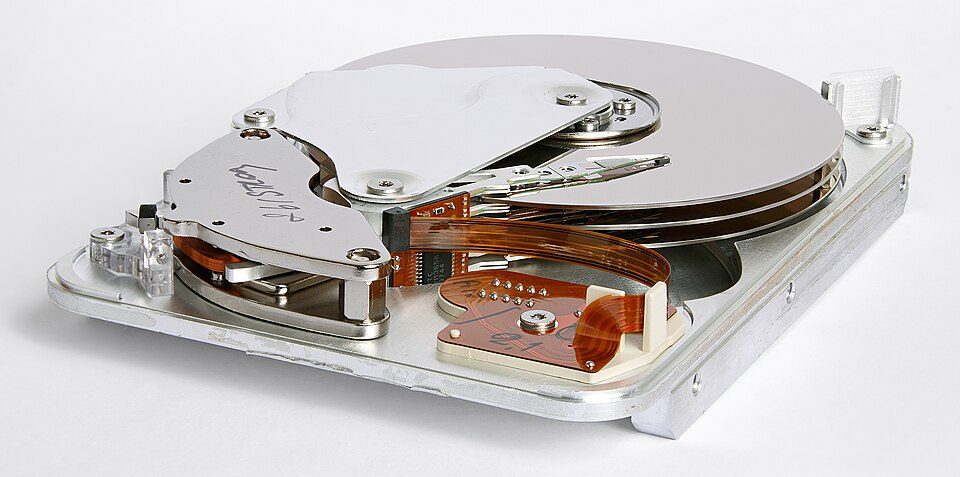

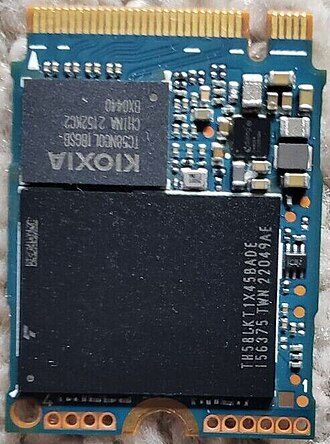
A hard disk drive (HDD) overwrites data in place, so deleted content remains until reused. A solid-state drive (SSD) stores data in flash cells managed by a controller. The controller spreads writes across cells (wear leveling) and, when the operating system sends a TRIM command for deleted blocks, may erase them in the background. Recovery of deleted data from an SSD is therefore often impossible, and two images of the same powered SSD can even differ if the controller was still working.

RAID spreads data across several disks, so each member disk must be imaged and the array rebuilt with the right order, stripe size and parity layout. Network-attached storage (NAS) and storage area networks (SAN) may need to be collected as logical volumes from the device, with the vendor’s own logs collected alongside.
Exam questions about partitions often give hex and ask for a size or an offset. Reverse the bytes, convert to decimal, then multiply by the sector size. The next reading, NTFS records and timestamps, opens the partition Viewer B found.
Inspect the three records, then use the evidence to answer the question.
1. Type byte
Offset 4: 0x07 (NTFS/exFAT)
2. Start LBA
Bytes 8–11 little-endian: 00 08 00 00 = 2048
3. Sector count
Bytes 12–15 little-endian: 00 40 06 00
Apply the reading
An MBR partition entry shows a starting LBA of 2048 and a size of 409,600 sectors. Where does the partition end, and how large is it in MiB with 512-byte sectors?
Compare your reasoning
It occupies LBA 2048 through 411,647. 409,600 sectors × 512 bytes is 209,715,200 bytes, which is 200 MiB.